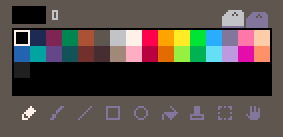
Permanently update the palette in the editor
------
-- 1. Overwrite the current palette with `pal(id, hexColor, 2)`
------

-- e.g. pure red, green, blue at indices 32, 33, 34
pal(32, 0xff0000, 2)
pal(33, 0x00ff00, 2)
pal(34, 0x0000ff, 2)

------
-- 2. Get the whole updated palette as a userdata
------

local palette = userdata("i32", 64)
for i = 0, 63 do
	-- Palette can be found at memory address 0x5000
	-- https://www.lexaloffle.com/dl/docs/picotron_manual.html#Memory_Layout
    palette:set(i, peek4(0x5000 + 4 * i))
end

------
-- 3. Find the process running gfx.p64
------

local gfx_id = nil
for process in all(fetch"/ram/system/processes.pod") do
    if process.prog == "/system/apps/gfx.p64" then
        gfx_id = process.id
        break
    end
end
if gfx_id == nil then
	error("error: /system/apps/gfx.p64 not found in process list")
end

------
-- 4. Update the the gfx.p64 running in memory
------

send_message(gfx_id, { event = "set_palette", palette = palette })
Credit to rob on the Picotron Discord for this code.
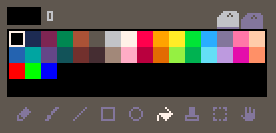
Color #32
The default dark grey color at index 32 (
0x202020) isn’t actually part of the palette. It’s used in the PIcotron GUI (e.g. as the background in the sprites editor), but renders as black when used in sprites. If you overwrite this color for your app, it will also change it in the GUI.
Tricks
Combine colors for patterned shapes
C.f. draw patterns.
-- Combining colors 12 (0xc) and 5 is done like this
circfill(x, y, r, 0x050c)

-- and is equivalent to
local colorA = 12
local colorB = 5
circfill(x, y, r, colorA | (colorB<<8))
3D toolbox
https://github.com/abledbody/blade3d/tree/master for trifill, textri, billboard, etc.
Implementation example : Blade3D Teapot Demo
Use TypeScript to write Picotron apps
https://codeberg.org/scambier/Picotron-TypeScript
This is a template to write Picotron apps in TypeScript, through TypeScriptToLua