NOTE
This article is part of a series:
- Collisions in Gamedev - Part 1 - Simple AABB
- Collisions in Gamedev - Part 2 - Dead Cells (you are here)
Ok, this title is a bit presumptuous, but…
The algorithm we’ll see in this article comes from Sébastien “Deepnight” Bénard, one of the original developers of Dead Cells, and from his own account, the game “uses this exact base engine”. You can read about it on his website.
Code available here
This demo feels very different than the AABB we studied in the first article. Here, the entity is not a hard box hitting walls, but feels more slippery, and appears to be gliding around corners.
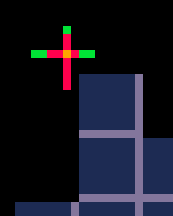
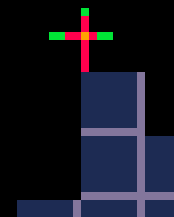
If you jump right next to the double-block ledge and press right, it will sort of teleport on top of it.
How does it work?
I purposefully represented the player as a sort of cross:
- The yellow point in the middle is the actual position (the sprite is drawn with a
-4,-4offset) - The red lines are the collision margins
- The green extremities are the “allowed” offsets that extend beyond the margins, to the borders of our 8x8 sprite
In this method, entities are represented by a single point. The coordinates have an integer part (the cell) and a float part (the offset inside the cell). An entity is considered to be colliding when the point’s offset inside its current cell moving is too close to a wall.
For exemple, to check a collision on the right:
-- Collision right
if hasCollision(self.cx + 1, self.cy) and self.xr >= 0.75 then
  self.xr = 0.75
  self.dx = 0
end
If the center point offset horizontal value is going over 75% of the cell’s width (6 pixels from the left) , we’re colliding.
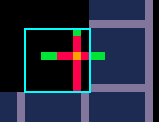
And to check a collision on the left:
-- Collision left
if hasCollision(self.cx - 1, self.cy) and self.xr <= 0.25 then
  self.xr = 0.25
  self.dx = 0
end
If the center point offset horizontal value is going under 25% of the cell’s width (2 pixels from the left) , we’re colliding.
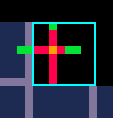
Same goes for the top collision (37.5%, 3 pixels from the top), and the bottom collision (50%, 4 pixels from the top).
Collision Response
Like in the original AABB collision code, we don’t have much of a response: in case of a collision, we just reset the offset to its threshold value. But when going over 1px/frame, instead of stopping before the collision, the entity actually enters the wall and then is being pushed back, with a slight bounce-like effect.
What is this method good for?
It’s obviously good enough for Dead Cells, which has a more dynamic gameplay (the character grabs and climbs ledges) than more rigid games like Mario or Celeste.
And since one of the main advantage of this method is that you can more easily navigate around corners, that makes it a good fit, in my opinion, for top-down games.
What works less well
This method, as originally described, has a few downsides and hard limitations:
- If you look too close or move too slowly, the teleport effect when gliding around corners can be obvious
- The fact that we’re only colliding from the center point of the entity can cause issues in a platformer requiring precise movements.
- The bounce effect when going too fast can be visually problematic
- Like with AABB, you can clip through a wall when going diagonally
- More importantly, our entities cannot be larger than the size of single cell
Can we improve it?
By itself, I think this can be an interesting and “good enough” method as it is, as long as you accept its limitations. The diagonal clipping can easily be avoided with additional checks, like with AABB.
If you wish to improve this method, it’s going to be harder than just tweak the response, and will require case-by-case solutions for each problem, and each specific need of your game. As always, there’s not a one-size-fits-all solution.
For exemple, for down collisions, it’s quite easy to check for a range instead of a point. This allows the player to walk over the ledge without falling
-- Collision down
local cxLeft = self.cx
local cxRight = self.cx

if self.xr < 0.25 then
  cxLeft = self.cx - 1
elseif self.xr > 0.875 then
  cxRight = self.cx + 1
end

if (hasCollision(cxLeft, self.cy + 1) or hasCollision(cxRight, self.cy + 1))
	and self.yr >= 0.5 then
  self.yr = 0.5
  self.dy = 0
end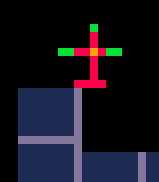
Code available here